Categories
Live Chat
Introducing Live Chat - a real-time web chat tool that enables contacts (website visitors) to get in touch directly with users and have a 2-way communication.
Users can configure live chat via Sites > Chat Widget > Chat Type> Live chat
Key features:
Chat Widget
Users can configure the look and feel of the chat widget - avatar, colour, agency branding, legal message
Users can also configure intro messages, fallback time due to inactivity and acknowledgement messages on chat widget settings
Users can get the code and then publish it on their website
Conversations:
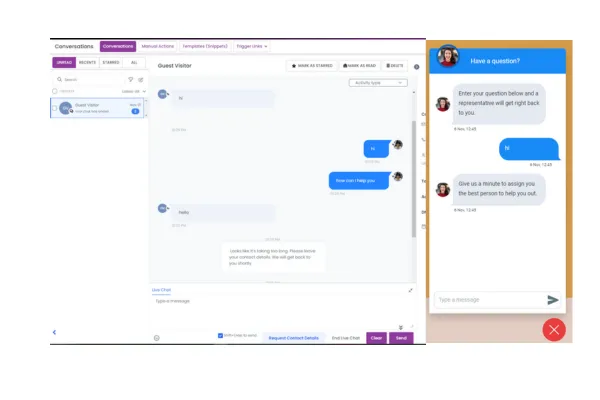
Dedicated Channel: Live chat will be displayed as a separate channel and users can communicate with the web visitor via Conversations.
Manual Actions: With Live Chat, users have two manual actions at their disposal.
“Request Contact Details,” allows users to send a contact detail form to the web visitor, facilitating further communication.
“End Live Chat,” empowers you to conclude the chat conversation when it has been successfully resolved.”
Note: Once live chat has been published on a website, it cannot be removed by disabling it through Labs (Settings). To disable live chat from the website, please continue to use the previous code