Stay ahead of the pack with our Pepper Updates Hub!
Discover the latest enhancements and upcoming features for our dog trainer's must-have PEPPER APP.
Be the first to know about exciting updates and explore detailed information on new features, making your training sessions even more efficient and enjoyable. Keep your finger on the pulse of the Pepper experience – your canine companions will thank you! 🐕📱 #PepperUpdates #DogTrainingRevolution
Categories
📢Announcement📢
Payments and customer LTV available on the Contacts page
Users will now be able to see the customer lifetime value (LTV) inside the contact details page under the Payments tab
This will also mention the date from which the contact has turned into a customer, i.e, the date on which the contact made the first payment
Users will also have the capability to charge a saved card on file or a new card for the contact without leaving the contacts page.
This solves major use cases of charging a card on file or recording a payment for the customer while on call or in-store. This will allow to charge a customer instantly for any custom amount and have the transaction registered in the CRM
Customer LTV and customer association date will only take live payments in consideration
Live Now!
Create Standalone Tasks
Harness the power of Task Management within the same platform.Create Tasks without Contacts, Remove Contacts from an assigned Task, Or reassign the contact to a task!!!
Going Live on 15 Jan 2024
Multiple Dashboards
We're thrilled to announce a game-changing update that will revolutionize your dashboard experience – Multiple Dashboards are here!
Previously, you were limited to just one dashboard, but with this update, you can now create and manage multiple dashboards tailored to your needs. 🚀
Live Now!
Activity Cards in Conversations
Introducing activity cards to provide a consolidated view of the following essential updates.
- Opportunities: When an opportunity is created, or updated or deleted
- Appointment : When an appointment is booked, rescheduled or cancelled
- DnD : When a contact is marked as DnD or, removed from DnD
- Invoice : When an invoice is sent or payment is received
Live Now!
Live Chat
Introducing Live Chat - a real-time web chat tool that enables contacts (website visitors) to get in touch directly with users and have a 2-way communication.
Users can configure live chat via Sites > Chat Widget > Chat Type> Live chat
Live Now!
Enhanced Calendar View
Calendar View with Overlay
- Quick Month View: Seamlessly navigate upcoming dates for efficient appointment planning.
- Multi-User Selection: Manage multiple users' appointments at once, improving organization.
- Multi-Calendar View: Consolidate various calendars into one, simplifying scheduling tasks.
- Multi-Group View: Effortlessly handle multiple groups' appointments for a comprehensive overview.
- Color Coding for Clarity: Easily distinguish user and group appointments with color-coded visuals.
- Intuitive Icons: Instantly recognize event types, from Google and Outlook events to recurring and blocked slots.
- Persistent Multi-Select: Save selected views for seamless, quick access to preferred calendars and users.
- Additional Info on Hover: Hover over events to view details without clicking, ensuring effortless scheduling.
Going Live on 20 Nov 2023
New Message Composer
We are excited to announce that we have given a fresh look to the message composer in the conversation panel.
This update brings a range of enhancements that will significantly enhance users’ email and message building experience.
Going Live on 13 Nov 2023
Enhanced Dashboard for Sub- Accounts
Enhanced Dashboard for Sub- Accounts
Dashboard went through major design changes to provide better accessibility. A dashboard is like a turbocharged control centre! It dazzles with dynamic charts, graphs, and metrics, offering a high-speed snapshot of crucial info.
Why did we make this change? What are we planning as a big picture?
Hold onto your hats because we’re about to revolutionise how you navigate and analyze data! Picture this: a brand-new, supercharged Dashboard and Reporting system! We’re talking about the power to customise subaccount dashboards/reports with a simple drag-and-drop feature and cherry-pick custom widgets that suit your every need. This is not just an upgrade; it’s a game-changer, designed to supercharge your experience and give you unprecedented control over your data. Get ready to explore a whole new world of possibilities!
Things which have changed?
1. Opportunities widgets like status, value, conversion rate, pipeline funnel, stage distribution and lead source report work on updated opportunity status date.
2. If a user doesn’t have access to a particular module, they will see the chart as locked and permission will be required.
3. We have streamlined the brand colors and acquired sleek charts to enhance the usability
4. We have a filter option for users of sub-accounts.
5. We have added one global date filter at the top.
Going Live on 15 Nov 2023
CRM Document Management
Here's what's new:
1. Documents Tab: In the Contact Details page, you'll now find a dedicated "Documents" tab, simplifying your document handling.
2. Four Document Sections:
All: Easily access all files in one place for that contact, without the need for folders.
Internal: Files that need to be stored internally for a contact are added here. It contains a standard folder called "Custom Fields" which going forward will contain all the files added to the "File-upload" type custom field for that contact. (access of these documents is for everyone who can access the contact)
Sent (Coming Soon): The ability to send documents to contacts using the client portal.
Received (Coming Soon): Stay tuned for the ability to receive documents from contacts via the client portal.
3. Add Files - Add files to the internal section of the document tab. Maximum size limit is 250 MB and file types supported includes PPT, Docs, PDF, and various image formats.
4. Search Functionality: Effortlessly search for documents by file name. The search will always scan the "All" section due to its folder-less structure. This feature streamlines document management, making it easier than ever to organize and access your important files.
Going Live on 15 Nov 2023
🐾New Features🐾
Live Chat
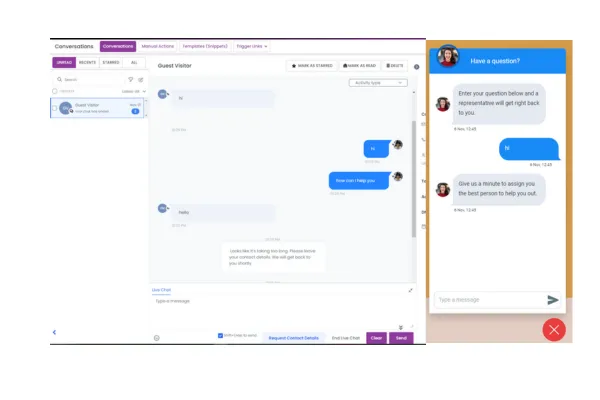
Introducing Live Chat - a real-time web chat tool that enables contacts (website visitors) to get in touch directly with users and have a 2-way communication.
Users can configure live chat via Sites > Chat Widget > Chat Type> Live chat
Key features:
Chat Widget
Users can configure the look and feel of the chat widget - avatar, colour, agency branding, legal message
Users can also configure intro messages, fallback time due to inactivity and acknowledgement messages on chat widget settings
Users can get the code and then publish it on their website
Conversations:
Dedicated Channel: Live chat will be displayed as a separate channel and users can communicate with the web visitor via Conversations.
Manual Actions: With Live Chat, users have two manual actions at their disposal.
“Request Contact Details,” allows users to send a contact detail form to the web visitor, facilitating further communication.
“End Live Chat,” empowers you to conclude the chat conversation when it has been successfully resolved.”
Note: Once live chat has been published on a website, it cannot be removed by disabling it through Labs (Settings). To disable live chat from the website, please continue to use the previous code