
Stay ahead of the pack with our Pepper Updates Hub!
Discover the latest enhancements and upcoming features for our dog trainer's must-have PEPPER APP.
Be the first to know about exciting updates and explore detailed information on new features, making your training sessions even more efficient and enjoyable. Keep your finger on the pulse of the Pepper experience – your canine companions will thank you! 🐕📱 #PepperUpdates #DogTrainingRevolution
Categories
📢Announcement📢
Payments and customer LTV available on the Contacts page
Users will now be able to see the customer lifetime value (LTV) inside the contact details page under the Payments tab
This will also mention the date from which the contact has turned into a customer, i.e, the date on which the contact made the first payment
Users will also have the capability to charge a saved card on file or a new card for the contact without leaving the contacts page.
This solves major use cases of charging a card on file or recording a payment for the customer while on call or in-store. This will allow to charge a customer instantly for any custom amount and have the transaction registered in the CRM
Customer LTV and customer association date will only take live payments in consideration
Live Now!
Create Standalone Tasks
Harness the power of Task Management within the same platform.Create Tasks without Contacts, Remove Contacts from an assigned Task, Or reassign the contact to a task!!!
Going Live on 15 Jan 2024
Multiple Dashboards
We're thrilled to announce a game-changing update that will revolutionize your dashboard experience – Multiple Dashboards are here!
Previously, you were limited to just one dashboard, but with this update, you can now create and manage multiple dashboards tailored to your needs. 🚀
Live Now!
Activity Cards in Conversations
Introducing activity cards to provide a consolidated view of the following essential updates.
- Opportunities: When an opportunity is created, or updated or deleted
- Appointment : When an appointment is booked, rescheduled or cancelled
- DnD : When a contact is marked as DnD or, removed from DnD
- Invoice : When an invoice is sent or payment is received
Live Now!
Live Chat
Introducing Live Chat - a real-time web chat tool that enables contacts (website visitors) to get in touch directly with users and have a 2-way communication.
Users can configure live chat via Sites > Chat Widget > Chat Type> Live chat
Live Now!
Enhanced Calendar View
Calendar View with Overlay
- Quick Month View: Seamlessly navigate upcoming dates for efficient appointment planning.
- Multi-User Selection: Manage multiple users' appointments at once, improving organization.
- Multi-Calendar View: Consolidate various calendars into one, simplifying scheduling tasks.
- Multi-Group View: Effortlessly handle multiple groups' appointments for a comprehensive overview.
- Color Coding for Clarity: Easily distinguish user and group appointments with color-coded visuals.
- Intuitive Icons: Instantly recognize event types, from Google and Outlook events to recurring and blocked slots.
- Persistent Multi-Select: Save selected views for seamless, quick access to preferred calendars and users.
- Additional Info on Hover: Hover over events to view details without clicking, ensuring effortless scheduling.
Going Live on 20 Nov 2023
New Message Composer
We are excited to announce that we have given a fresh look to the message composer in the conversation panel.
This update brings a range of enhancements that will significantly enhance users’ email and message building experience.
Going Live on 13 Nov 2023
Enhanced Dashboard for Sub- Accounts
Enhanced Dashboard for Sub- Accounts
Dashboard went through major design changes to provide better accessibility. A dashboard is like a turbocharged control centre! It dazzles with dynamic charts, graphs, and metrics, offering a high-speed snapshot of crucial info.
Why did we make this change? What are we planning as a big picture?
Hold onto your hats because we’re about to revolutionise how you navigate and analyze data! Picture this: a brand-new, supercharged Dashboard and Reporting system! We’re talking about the power to customise subaccount dashboards/reports with a simple drag-and-drop feature and cherry-pick custom widgets that suit your every need. This is not just an upgrade; it’s a game-changer, designed to supercharge your experience and give you unprecedented control over your data. Get ready to explore a whole new world of possibilities!
Things which have changed?
1. Opportunities widgets like status, value, conversion rate, pipeline funnel, stage distribution and lead source report work on updated opportunity status date.
2. If a user doesn’t have access to a particular module, they will see the chart as locked and permission will be required.
3. We have streamlined the brand colors and acquired sleek charts to enhance the usability
4. We have a filter option for users of sub-accounts.
5. We have added one global date filter at the top.
Going Live on 15 Nov 2023
CRM Document Management
Here's what's new:
1. Documents Tab: In the Contact Details page, you'll now find a dedicated "Documents" tab, simplifying your document handling.
2. Four Document Sections:
All: Easily access all files in one place for that contact, without the need for folders.
Internal: Files that need to be stored internally for a contact are added here. It contains a standard folder called "Custom Fields" which going forward will contain all the files added to the "File-upload" type custom field for that contact. (access of these documents is for everyone who can access the contact)
Sent (Coming Soon): The ability to send documents to contacts using the client portal.
Received (Coming Soon): Stay tuned for the ability to receive documents from contacts via the client portal.
3. Add Files - Add files to the internal section of the document tab. Maximum size limit is 250 MB and file types supported includes PPT, Docs, PDF, and various image formats.
4. Search Functionality: Effortlessly search for documents by file name. The search will always scan the "All" section due to its folder-less structure. This feature streamlines document management, making it easier than ever to organize and access your important files.
Going Live on 15 Nov 2023
🐾New Features🐾
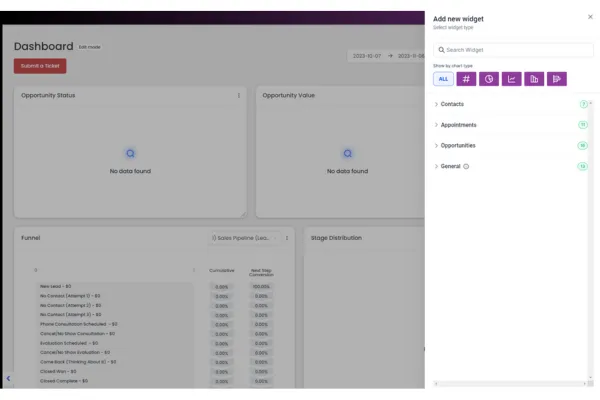
Custom Widgets for Dashboards
🤩 What’s New:
Prepare to elevate your dashboard game with our latest update, introducing powerful features that will transform your reporting and insights. Here’s what you can expect:
Widget Creation
: Enjoy a seamless experience with simple drag-and-drop functionality that allows you to effortlessly add widgets to your dashboard. This means you can customize your reporting effortlessly, enhancing your ability to track and analyze your data.
Widget Categories
: We’ve categorized widgets for your convenience, including Appointments, Contacts, Opportunities, and General insights. This organization makes it easier than ever to find the exact widget you need to gain valuable insights.
Predefined Widgets
: Access a treasure trove of over 35 predefined widgets from different categories, eliminating the need for time-consuming customization. With these ready-made widgets, you can save time and get valuable insights right away.
Different Chart Types
: Visualize your data in the way that suits your analysis best. Our widgets support various chart types, such as numerics, Donut charts, line graphs, bar graphs, and horizontal bar graphs. This flexibility empowers you to present data in the most impactful way possible.
Custom Widgets
: Take complete control of your widgets. Customize them by adding your own filters, conditions, and changing chart types. This feature enables you to fine-tune your dashboard precisely to your unique requirements.
Edit Mode
: Managing your dashboard has never been easier. In edit mode, you can effortlessly rearrange widgets, edit them, and reposition them to create a personalized dashboard that perfectly suits your workflow.
🌟 Why We Did This:
We understand that data is the lifeblood of your decision-making process, and we want to make sure you have all the tools you need to harness its power. With these enhancements, you’ll experience:
Efficiency
: Save time by quickly adding predefined widgets, reducing the need for manual customization.
Flexibility
: Customize your widgets to tailor your dashboard to your specific needs.
Clarity
: Different chart types provide clearer data visualization for more insightful analysis.
User-Friendly
: Drag-and-drop functionality and an intuitive edit mode make managing your dashboard a breeze.
🌟 How It Helps You:
Our latest dashboard update is designed to empower you in various ways:
Enhanced Productivity
: Streamline your reporting process, allowing you to focus on what matters most: making informed decisions.
Better Insights
: Diverse chart types and custom widgets provide a deeper understanding of your data, helping you uncover hidden trends and opportunities.
Simplified Workflow
: Drag-and-drop functionality and easy widget management simplify the dashboard customization process, even for beginners.
Personalization
: Tailor your dashboard to your unique business needs, ensuring you have the right information at your fingertips.
🚀 What’s Next:
We’re not stopping here! Stay tuned for more exciting updates, including:
Expanded Widget Categories
: Look out for additional widget categories like Payments, Emails, SMS, and more, to provide even more insight into your data.
Revamped Reporting Section
: Coming soon, you’ll enjoy a complete overhaul of the REPORTING SECTION, featuring custom report creation and a selection of templates.
Scheduled Reporting
: Soon, you’ll be able to effortlessly schedule your reports, ensuring that your insights and business updates reach your clients and customers on time.
Multiple Dashboards
: Create and manage multiple dashboards
Permissions
: Set permissions for your reports and dashboards, ensuring only the right eyes see your valuable insights.
We’re committed to continually enhancing your experience, so stay with us for the journey ahead! 🔥🔥
Use case for different widgets
Contact Widgets:
Contact Count: Use this widget to get a quick overview of the total number of contacts for your entire team. Great for tracking overall growth.
Contact Count (Logged in user): If you want to focus on contacts assigned to you, use this widget. It helps you see how many contacts you are personally responsible for.
Contacts by Tags: If you've categorized your contacts with tags (e.g., "Hot Leads," "New Prospects"), this widget lets you see how your contacts are distributed by these tags.
Contacts by Activity: Monitor the number of contacts with specific activities within a defined time period. Useful for tracking engagement.
Contacts by Type: Categorize your contacts by type and visualize how they are distributed with this widget.
Contacts by Assigned User: If you have a team managing different contacts, use this widget to see how contacts are mapped to various team members.
Contacts by Company Name: Get insights into your contacts by looking at how they are distributed among different company names.
Appointment Widgets:
Appointment Count: Use this widget to track the total number of appointments. You can group the count by status or assignee, depending on what you want to focus on.
Appointment Count over a Date Range: Monitor appointment numbers within a specific time period. Group them by status or assignee for deeper insights.
Appointment Counts by Status: Visualize how your appointments are distributed by their status (e.g., "Confirmed," "No Show").
Booked Appointments: Keep an eye on the number of booked appointments for a selected date range.
Confirmed Appointments: Track the number of confirmed appointments for a specific time frame.
Showed Appointments: Monitor the number of appointments where customers showed up.
No Show Appointments: Find out how many appointments resulted in a "No Show."
Cancelled Appointments: Keep track of cancelled and invalid appointments within a specified date range.
No Show Rate Over Time: Observe the trend in "No Show" appointments over time.
Upcoming Appointments (Week): Plan for the week ahead by checking the total number of appointments scheduled.
Upcoming Appointment (Logged in User): Focus on your upcoming appointments specifically.
Past Month Created Appointments: Review the total number of appointments created in the past month.
Past Month Created Appointments (Logged in User): Track appointments created by the logged-in user over the past month.
These widgets help you stay organized and make data-driven decisions about your appointments.
Opportunity Widgets:
Opened Opportunities: Use this widget to see how many opportunities are currently open. Helpful for real-time tracking.
Won Opportunities: Keep a record of opportunities you've successfully closed as deals.
Lost Opportunities: Monitor opportunities that did not convert into deals.
Abandoned Opportunities: Keep an eye on opportunities that were left without action.
Opportunity Count: Get an overview of your total opportunities.
Opportunity Counts Over Time: Visualize how opportunities have been distributed over different time periods.
Opportunity Revenue Over Time: Track the revenue generated by opportunities over time.
Opportunity Counts by Status: Categorize your opportunities by status (e.g., "In Progress," "Closed").
Opened Opportunity Value: Understand the monetary value of opportunities currently in progress.
Lost Opportunity Value: See the value of opportunities that were lost.
Abandoned Opportunity Value: Monitor the monetary value of abandoned opportunities.
Won Opportunity Value: Keep track of the monetary value of opportunities that converted into deals.
Total Opportunity Value: Get an overview of the cumulative monetary value of all opportunities.
General Widgets:
Opportunity Status: Visualize the status of your opportunities.
Opportunity Value: Understand the total value of opportunities, categorized by status.
Conversion Rate: Track the conversion rate and revenue generated by won opportunities.
Funnel: Get a detailed view of your sales funnel and conversion rates at each stage.
Stages Distribution: Understand how opportunities are distributed among different stages.
Tasks: Monitor all tasks added and the team member it is assigned to.
Manual Actions: Keep track of manual actions, such as SMS and phone calls, in your campaigns.
Lead Source Report: Get an overview of total leads by source.
Google Analytics Count: Track the number of total views in your Google Analytics report.
Google Analytics Chart: Get insights into the number of total views and interactions on your website.
Google Business Profile: Monitor your Google Business Profile metrics.
Facebook Ads Report: Keep an eye on clicks, spending, CTR, and CPC for Facebook ads.
Google Ads Report: Track clicks, spending, CTR, and CPC for Google ads.